
Typing is a bottleneck.
Your voice is 3x faster.
Average typing: 40 WPM. Average speaking: 130 WPM. Anna bridges the gap — your voice becomes a direct command interface to your entire Mac.
See It In Action
This is Anna.
A floating voice interface that lives in your menu bar. Speak a command, watch it execute.
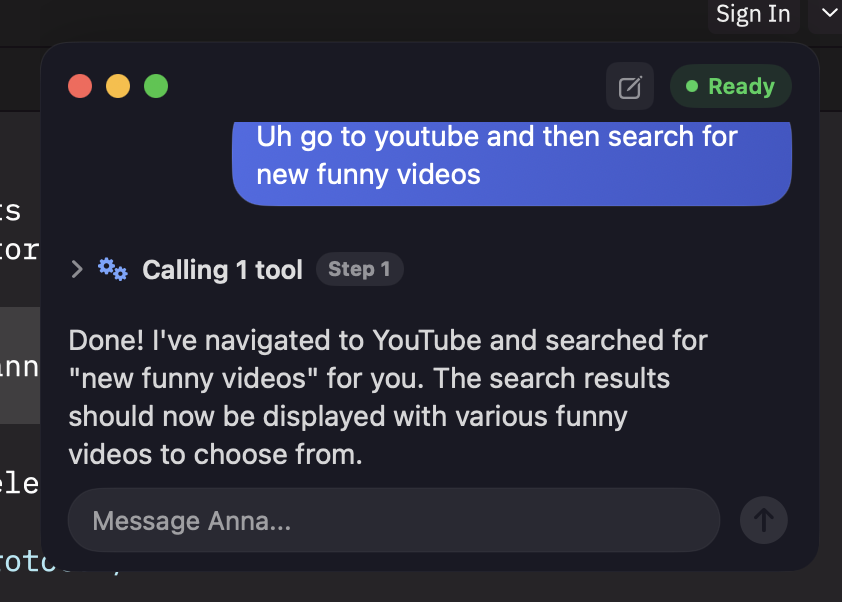
Voice Agent
Hold the hotkey, speak naturally. Anna transcribes, plans, and executes — all in one floating bubble.
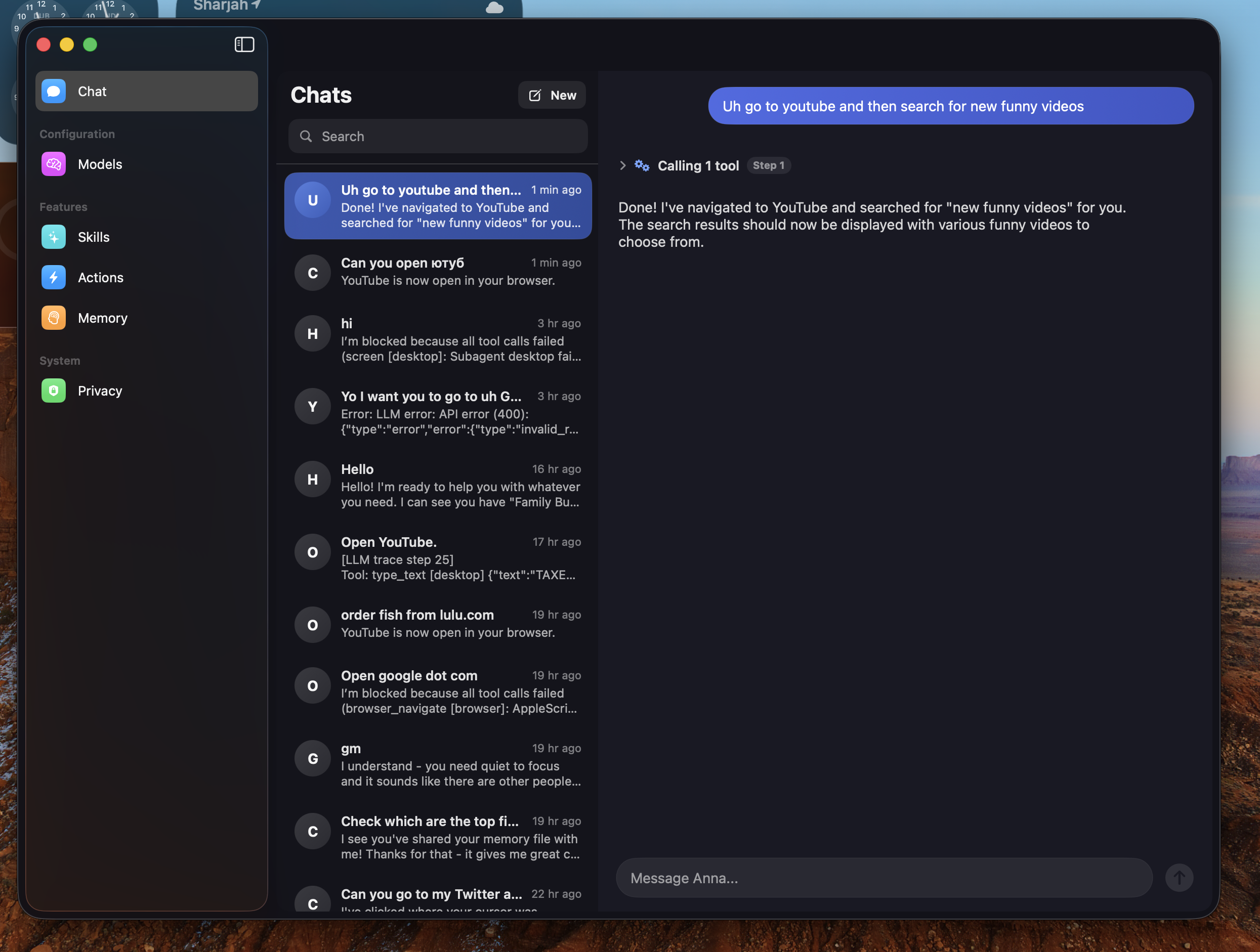
Chat & Settings
Full chat history, model switching, action toggles, and privacy controls. Everything in one native macOS window.

Capabilities
Not just dictation.
A full AI agent.
Anna doesn't just transcribe — she understands, plans, and executes multi-step workflows across your entire Mac.
Two modes. One natural interface.
Agent Mode (Right ⌘) — speak a command, Anna plans and executes. Dictation (Right ⌥) — your words appear at cursor instantly.
Your data stays yours.
On-device STT via Parakeet. Your API key talks directly to your LLM. No servers, no analytics, no telemetry. Open source — verify every line.
13 tools. Growing.
Navigate, click, read, fill.
Full browser control through voice. Navigate pages, click elements, extract content, fill forms, run JavaScript — hands-free.
iMessage. Calendar. Reminders.
"Text Mom I'm on my way" — voice-driven communication that actually works. Create events, set reminders, send texts. All by speaking.
Guardrails built in.
Max-step limits, loop detection, verification constraints. Anna will never run away. Every chain is bounded and auditable.
Claude. GPT. Gemini. 100+
Bring your own API key. Switch providers anytime. OpenRouter gives you access to 100+ models. No vendor lock-in, ever.
Comparison
Anna vs. the rest
The only voice assistant that combines local STT, desktop automation, browser control, and multi-step AI planning.
| Anna | Siri | VoiceInk | ChatGPT | |
|---|---|---|---|---|
| Voice input | ✓ | ✓ | ✓ | ✓ |
| Local STT | ✓ | ✗ | ✓ | ✗ |
| Desktop automation | ✓ | Limited | ✗ | ✗ |
| Browser control | ✓ | ✗ | ✗ | ✗ |
| Multi-step tool chains | ✓ | ✗ | ✗ | ✗ |
| Choose your LLM | ✓ | ✗ | ✗ | ✗ |
| Messages / Calendar | ✓ | ✓ | ✗ | ✗ |
| Screen awareness | ✓ | ✗ | ✗ | ✓ |
| Open source | ✓ | ✗ | ✗ | ✗ |
| No subscription | ✓ | ✓ | ✓ | ✗ |

How It Works
Three steps. Zero friction.
From thought to action in under 3 seconds.
Speak
Hold Right ⌘ and talk naturally. Parakeet transcribes on-device in real time — no internet needed.
Think
Anna sends your request with full context — active app, window title, clipboard — to your chosen LLM. It plans the right sequence of actions.
Act
Opens apps, types text, navigates browsers, creates calendar events, sends messages — then confirms what it did.
What People Say
Loved by builders
"I replaced 90% of my keyboard shortcuts with voice commands. Anna is like having a second pair of hands."
"The dictation mode alone is worth it. 130 WPM with zero errors. But then you discover agent mode and it's a whole other level."
"Finally a voice assistant that's actually private. My API key, my data, no cloud middleman. This is how it should be."
"I have RSI and Anna changed my workflow completely. Full Mac control by voice — browser, messages, calendar, everything."

Use Cases
Built for how you work
Whether you're coding, writing, managing, or navigating with limited mobility — Anna adapts to you.
Developers
Multi-step workflows by voice. Open files, search docs, run builds — hands stay on keyboard.
Writers
130 WPM dictation straight to cursor. Draft emails, blog posts, messages — at the speed of thought.
Professionals
Voice-driven scheduling, messaging, and task management. "Schedule a meeting with John at 3pm tomorrow."
Accessibility
Full Mac control without keyboard or trackpad. Browse the web, send messages, manage files — all by voice.
Pricing
Free and open source. Forever.
No hidden fees. No subscriptions. You only pay for your own LLM API usage.
Free forever. BYOK.
- All 13 tools
- All LLM providers
- Local STT engine
- Unlimited usage
- Full source code
- Community support
One-time purchase. No subscription.
- Everything in Free
- Pre-built .app bundle
- Automatic updates
- Priority support
- 3 Mac license
- Early access to new tools
FAQ
Common questions
Does Anna send my voice to the cloud?
No. Speech-to-text runs entirely on your Mac using the Parakeet engine. Your voice audio never leaves your device. Only the transcribed text is sent to your chosen LLM provider.
What LLM providers are supported?
Anna supports Claude (Anthropic), GPT (OpenAI), Gemini (Google), and 100+ models via OpenRouter. Bring your own API key — switch anytime.
How much does it cost to use?
Anna itself is free and open source. You pay only for your own LLM API usage, which typically costs $0.01–$0.05 per voice command depending on the model.
What macOS version do I need?
macOS 14 Sonoma or later. Anna uses modern APIs for accessibility, screen capture, and audio processing that require Sonoma+.
Can Anna control any app?
Anna can open any app, type text anywhere, and use keyboard/mouse automation. For deeper integration, it has dedicated tools for Messages, Calendar, Reminders, and Safari/Chrome browser control.
Is it really open source?
Yes — MIT licensed. Every line of code is on GitHub. You can audit, fork, modify, and contribute. No telemetry, no analytics, no hidden network calls.
What permissions does Anna need?
Microphone (for voice input), Accessibility (for typing and app control), and optionally Screen Recording (for screen reading). Anna's onboarding walks you through each one.
Get Started
Up and running
in two minutes.
- macOS 14 Sonoma or later
- Microphone + Accessibility permissions
- An API key from any supported provider
# Clone and build
git clone https://github.com/anthropics/anna.git
cd anna && swift build

# Run
swift run Anna

# Or build a .app
scripts/release-macos.sh
Stop clicking.
Start talking.
Your Mac was built for more than point and click. Give it a voice.